抱歉,您的浏览器无法访问本站
本页面需要浏览器支持(启用)JavaScript
了解详情 >

软件包类型

DEB #适用于UBlinux和DEBlinux这两种Linux系统
RPM #适用于redhat、centOS以及fadora这三种Linux系统
bz2|gz|xz #压缩包类型,分为两种:

一种解压缩后需要安装需要源码编译,如插件ntfs-3g_ntfsprogs-2017.3.23.tgz,需要编译 “configure”
另一种是绿色软件,解压缩以后可以直接使用,不需要安装,如Firefox-latest-x86_64.tar.bz2

Yum

yum,全称“Yellow dog Updater, Modified”,是一个专门为了解决包的依赖关系而存在的软件包管理器。

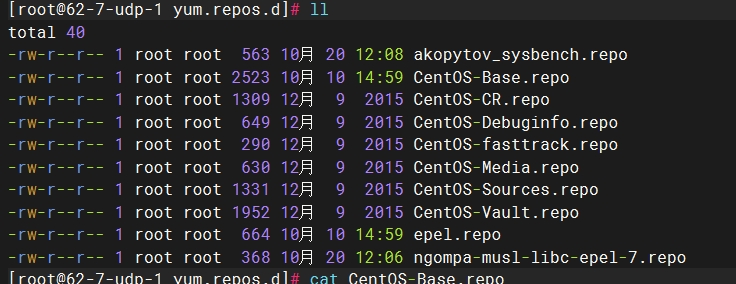
网络 yum 源配置文件位于 /etc/yum.repos.d/ 目录下,文件扩展名为*.repo(只要扩展名为 *.repo 的文件都是 yum 源的配置文件)。
查看目录下的CentOS-Base.repo文件:
path

config

1
2
3
4
5
6
7
8
9
10
11
12
13
14
15
16
17
18
19
20
21
22
23
24
25
26
27
28
29
30
31
32
33
34
35
36
37
38
39
40
41
42
43
44
45
46
47
48
49
50
51
52
53
54
55
56
57
58
59
60
61
62
63
64
# 以下为一个 CentOS-Base.repo 文件的举例,缺少mirrorlist
[root@62-7-udp-1 yum.repos.d]# cat CentOS-Base.repo
# CentOS-Base.repo
#
# The mirror system uses the connecting IP address of the client and the
# update status of each mirror to pick mirrors that are updated to and
# geographically close to the client. You should use this for CentOS updates
# unless you are manually picking other mirrors.
#
# If the mirrorlist= does not work for you, as a fall back you can try the
# remarked out baseurl= line instead.
#
#

[base]
name=CentOS-$releasever - Base - mirrors.aliyun.com
failovermethod=priority
baseurl=http://mirrors.aliyun.com/centos/$releasever/os/$basearch/
http://mirrors.aliyuncs.com/centos/$releasever/os/$basearch/
http://mirrors.cloud.aliyuncs.com/centos/$releasever/os/$basearch/
gpgcheck=1
gpgkey=http://mirrors.aliyun.com/centos/RPM-GPG-KEY-CentOS-7

#released updates
[updates]
name=CentOS-$releasever - Updates - mirrors.aliyun.com
failovermethod=priority
baseurl=http://mirrors.aliyun.com/centos/$releasever/updates/$basearch/
http://mirrors.aliyuncs.com/centos/$releasever/updates/$basearch/
http://mirrors.cloud.aliyuncs.com/centos/$releasever/updates/$basearch/
gpgcheck=1
gpgkey=http://mirrors.aliyun.com/centos/RPM-GPG-KEY-CentOS-7

#additional packages that may be useful
[extras]
name=CentOS-$releasever - Extras - mirrors.aliyun.com
failovermethod=priority
baseurl=http://mirrors.aliyun.com/centos/$releasever/extras/$basearch/
http://mirrors.aliyuncs.com/centos/$releasever/extras/$basearch/
http://mirrors.cloud.aliyuncs.com/centos/$releasever/extras/$basearch/
gpgcheck=1
gpgkey=http://mirrors.aliyun.com/centos/RPM-GPG-KEY-CentOS-7

#additional packages that extend functionality of existing packages
[centosplus]
name=CentOS-$releasever - Plus - mirrors.aliyun.com
failovermethod=priority
baseurl=http://mirrors.aliyun.com/centos/$releasever/centosplus/$basearch/
http://mirrors.aliyuncs.com/centos/$releasever/centosplus/$basearch/
http://mirrors.cloud.aliyuncs.com/centos/$releasever/centosplus/$basearch/
gpgcheck=1
enabled=0
gpgkey=http://mirrors.aliyun.com/centos/RPM-GPG-KEY-CentOS-7

#contrib - packages by Centos Users
[contrib]
name=CentOS-$releasever - Contrib - mirrors.aliyun.com
failovermethod=priority
baseurl=http://mirrors.aliyun.com/centos/$releasever/contrib/$basearch/
http://mirrors.aliyuncs.com/centos/$releasever/contrib/$basearch/
http://mirrors.cloud.aliyuncs.com/centos/$releasever/contrib/$basearch/
gpgcheck=1
enabled=0
gpgkey=http://mirrors.aliyun.com/centos/RPM-GPG-KEY-CentOS-7
  • [extras]yum的ID,必须唯一的,本地有多个yum源的时候,这里也必须是唯一的。
  • name 具体的yum源名称,相当于对它的描述信息。
  • mirrorlist 是镜像服务器地址列表,里面有很多的服务器地址。
  • baseurl 和mirrorlist一样,都是指向yum源的地址,不同的是包含地址的多少,一般只写一个地址,直接用baseurl。
  • gpgcheck 0=取消验证,1=使用公钥检验rpm的正确性。
  • gpgkey 校验的key地址,如果gpgcheck=0的话,那么gpgkey就可以不用填写。
  • failovermethod 有两个选项roundrobin 和priority,意思分别是有多个url可供选择时,yum 选择的次序,roundrobin 是随机选择,如果连接失败则使用下一个,依次循环,priority 则根据url 的次序从第一个开始。如果不指明,默认是roundrobin

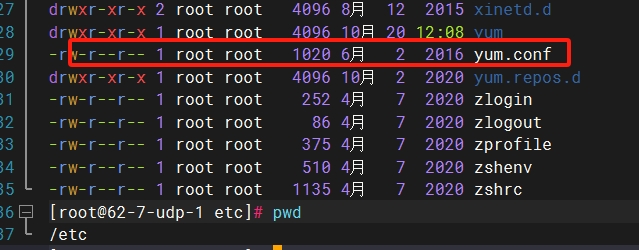
yum通常会有一个配置文件yum.conf,一般位于 etc文件夹下
yumconf

1
2
3
4
5
6
7
8
9
10
11
12
13
14
15
16
17
18
19
20
21
22
23
24
25
26
27
28
29
30
# 以下为一个yum.conf文件的举例
[root@62-7-udp-1 etc]# cat yum.conf
[main]
cachedir=/var/cache/yum/$basearch/$releasever
keepcache=0
debuglevel=2
logfile=/var/log/yum.log
exactarch=1
obsoletes=1
gpgcheck=1
plugins=1
installonly_limit=5
bugtracker_url=http://bugs.centos.org/set_project.php?project_id=23&ref=http://bugs.centos.org/bug_report_page.php?category=yum
distroverpkg=centos-release
override_install_langs=en_US.UTF-8
tsflags=nodocs


# This is the default, if you make this bigger yum won't see if the metadata
# is newer on the remote and so you'll "gain" the bandwidth of not having to
# download the new metadata and "pay" for it by yum not having correct
# information.
# It is esp. important, to have correct metadata, for distributions like
# Fedora which don't keep old packages around. If you don't like this checking
# interupting your command line usage, it's much better to have something
# manually check the metadata once an hour (yum-updatesd will do this).
# metadata_expire=90m

# PUT YOUR REPOS HERE OR IN separate files named file.repo
# in /etc/yum.repos.d

配置说明

  • cachedir yum缓存的目录,yum在此存储下载的rpm包和数据库,一般情况下路径是/var/cache/yum/$basearch/$releasever
  • keepcache 是否保留缓存内容,0=安装后删除软件包,1=安装后保留软件包
  • debuglevel 除错级别,0-10,默认是2,只记录安装和删除记录。
  • logfile 存放系统更新软件的日志的目录。可以根据路径去查询自己在过期做了哪些更新。
  • exactarch 代表是否只升级和你安装软件包CPU体系一致的包,有1和0两个选项,1为是,0为否。
  • obsoletes 这是一个update的参数,是否允许旧版本的运行,1表示允许。
  • gpgcheck 是否验证GPG(GNU Private Guard)密钥,1表示验证。
  • plugins 是否允许插件,1代表允许。
  • installonly_limit 保存几个内核。
  • pkgpolicy 包的策略,一共有两个选项,newest和last,这个的作用是如果设置了多个源,而同一个软件在不通的源中同时存在,yum应该选哪一个。如果是newest,则会安装最新的那个版本。如果是last,这回将服务器ID以字母排序,并选择最后的那个服务器上的软件。
  • distroverpkg 指定一个软件包,yum会根据这个包判断发行版本,默认是RedHat-release,也可以是CentOS-release。
  • tolerant 表示yum是否容忍命令行发生与软件包有关的错误,有1和0两个选项。
  • retries 网络链接发生错误时的重试次数,如果设置为0,则会无限重试
  • override_install_langs 这是一种覆盖rpm的_install_lang宏的方法。而不必在rpm的宏文件中更改它。默认值为nothing。
  • tsflags 要传递给rpm事务集的事务标志的逗号或空格分隔的列表。这些包括’noscripts’, ‘notriggers’, ‘nodocs’, ‘test’, ‘justdb’和’nocontexts’。’repackage’也可用,但对于较新的RPM版本不起作用。您可以设置所有或其中任何一个。但是,如果您不知道它们在rpm事务集上下文中的作用,那么最好不要去管它。默认值为空列表。

yum的repo配置文件中可用的变量

  • $releasever: 当前OS的发行版的主版本号,如:8,7,6
  • $arch: CPU架构,如:arch64, i586, i686,x86_64等
  • $basearch:系统基础平台;i386, x86_64
  • $contentdir:表示目录,比如:centos-8,centos-7
  • $YUM0-$YUM9:自定义变量

yum的具体配置可查看man手册:https://man7.org/linux/man-pages/man5/yum.conf.5@@yum.html

yum的常见命令

1
2
3
4
5
6
7
8
9
10
11
12
13
14
15
16
17
18
19
20
21
22
23
24
25
26
27
28
29
30
31
32
33
yum install [软件包名称]     # 安装软件包 
yum search [软件包名称] # 搜索软件包
yum list [软件包名称] # 显示指定程序包安装情况
yum list # 显示所有已安装及可安装的软件包
yum remove [软件包名称] # 删除程序包
yum erase [软件包名称] # 删除程序包
yum update # 内核升级或者软件更新
yum update [软件包名称] # 更新软件包
yum check-update # 检查可更新的程序
yum info [软件包名称] # 显示安装包信息
yum provides "*/rz" # 列出 rz 命令由哪个软件包提供
yum grouplist # 查询可以用 groupinstall 安装的组名称
yum groupinstall [组名称] # 安装程序组
yum groupremove [组名称] # 删除程序组
yum deplist [软件包名称] # 查看程序依赖情况

yum clean packages # 清除缓存目录下的软件包
yum clean headers # 清除缓存目录下的 headers
yum clean all # 清除缓存目录下的所有缓存

yum makecache # 建立元数据缓存
yum -y update # 升级所有软件包和系统内核
yum -y upgrade # 只升级软件包不升级内核

# 注意:-y 表示自动安装,不需要交互,如果不加 -y ,安装中会出现问询,需要手动处理。
# -y 下载安装

# 以下两种试了一下,并不能用于命令中,会导致命令直接报错
# -d 只下载不安装
# -N 不安装

#downloadonly可以仅下载所需软件和及其依赖包,大大解决了无网安装时找依赖包的问题
yum install [软件包名称] --downloadonly --downloaddir=/tmp/mysoftware

注意
以上命令大部分可同时安装多个软件包或查询多个命令,具体使用可查看man手册
https://man7.org/linux/man-pages/man8/yum.8@@yum.html

某些系统中的,或者是某个包
需要掌握换源这类知识。
进程守护 systemctrl
DMP使用进程守护拉起来
ushard分库分表和读写分离写了大量日志,不用的话可以卸载

扩展数据库组件用的

评论